
Mac window switchers: all your options
Too many windows, too much searching. Find the one you need at a glance and get back to what you were doing.
How do the options compare?
There are many ways to switch between windows on a Mac, from the shortcuts built into macOS to dedicated apps. The matrix below compares the main options feature by feature. AltTab is our app, and we have tried to mark every box accurately. Select a name to read the full comparison.
| Feature | AltTab | Built-in | Raycast | Contexts | Witch | HyperSwitch | TabTab |
|---|---|---|---|---|---|---|---|
| Free tier | × | × | |||||
| Paid tier | $9.99 | None | $8/mo | $9.99 | $14 | None | $18.99 |
| Open source | × | × | × | × | × | × | |
| Window thumbnails | × | × | × | × | × | ||
| App-icon view | × | × | × | × | |||
| Titles view | × | × | |||||
| Search (type to filter) | × | × | |||||
| Multiple custom shortcuts | × | × | × | × | |||
| Dark mode | × | ||||||
| Accessibility (VoiceOver) | × | × | × | ||||
| Auto-size thumbnails | × | × | × | × | × | × | |
| Minimized & hidden windows | × | × | × | × | |||
| Spaces support | × | × | × | ||||
| Maintenance | Active | Active | Active | Active | Active | Inactive | Active |
If you mostly work with one window per app, the built-in tools are enough. AltTab is the most complete option if you want to see your windows as thumbnails and switch to any of them, including minimized and hidden ones, for free and open source. Try other switchers to see how they compare. Some may have niche features that work best for your workflows.
Frequently asked questions
What is the best window switcher for Mac?
It depends on how you work. For free, open-source thumbnail switching across every window and Space, AltTab is the most complete. For search-first switching, look at Contexts, Raycast, or TabTab. For deep configuration, Witch.
Does macOS have a built-in window switcher?
Command-Tab switches apps and Command-Backtick cycles the current app’s windows, but there is no built-in switcher for every individual window across Spaces. Apps like AltTab add that.
What is the best free Mac window switcher?
AltTab is free and open source and handles every window, including minimized and hidden ones, across all Spaces, with thumbnails, search, and appearance styles.
Are these window switchers on the Mac App Store?
Most are not. A window switcher needs Accessibility access to move focus between windows, which the Mac App Store does not allow, so apps like AltTab are distributed directly instead.
Set up AltTab
 Download AltTab: Download Free for Mac
 Open AltTab. The first time, macOS asks for Accessibility and Screen Recording permissions in System Settings under Privacy & Security. Accessibility lets AltTab switch windows; Screen Recording lets it show thumbnails. Grant both.
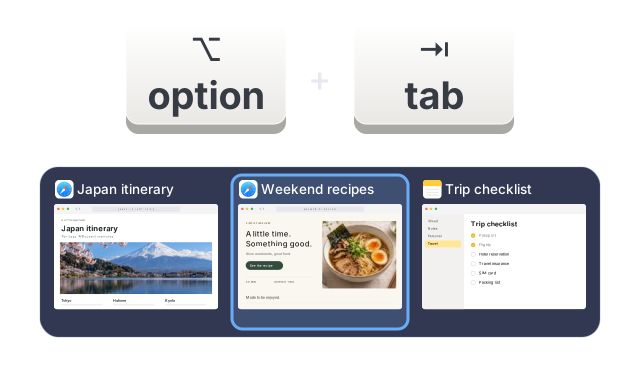 Press Option-Tab, the default shortcut, to bring up the switcher. Hold Option and tap Tab to move through windows, then release to switch. If you want the Windows muscle memory exactly, you can remap the shortcut to Command-Tab in AltTab’s settings.
Not sure yet?
Every Pro feature is free for 14 days after you install. Afterwards, AltTab keeps working for free.