
How to alt-tab on a Mac
Used to Alt+Tab on Windows? Command-Tab on your Mac only switches apps. Get straight to the window you want with AltTab.
Frequently asked questions
Does macOS have an Alt+Tab?
Not in the Windows sense. Command-Tab switches between apps, and Command-Backtick cycles the current app’s windows on the current Space. Neither cycles every window the way Windows Alt+Tab does. AltTab adds that behavior.
How do I switch between windows of the same app on a Mac?
Press Command-Backtick (the key above Tab) to cycle the frontmost app’s windows on the current Space. It skips minimized windows. AltTab shows all of them, including minimized and hidden, across every Space.
Can I make Command-Tab switch windows instead of apps?
Not with the built-in switcher. Install AltTab and remap its shortcut to Command-Tab, and it will show every window instead of one icon per app.
Is AltTab free?
Yes. AltTab is free and open source. An optional Pro tier ($9.99, one-time, with a 14-day trial) adds type-to-search, extra appearance styles, auto-sizing, and more shortcuts.
How to alt-tab on a Mac
If you have used Windows, Alt+Tab is muscle memory: hold Alt, tap Tab, and cycle through every open window one by one. On a Mac the same keys do not behave the same way, and that trips up a lot of people who switch platforms. Here is what macOS gives you out of the box, where it stops short of real alt-tab, and how to get Windows-style switching if you want it.
Command-Tab: switches apps, not windows
The closest built-in shortcut is Command-Tab. It cycles through running applications, not individual windows. If you have three Finder windows and a dozen tabs across two browser windows, Command-Tab still shows one icon per app. Selecting an app brings its most recent window forward, but there is no quick way to land on a specific window. For one window per app this is fine. For many windows of the same app it is not.
Command-Backtick: windows of the current app
Command-Backtick (the key above Tab) cycles through the windows of the app you are already in. It helps, but it is limited: it only covers the frontmost app, only on the current Space, and it skips minimized windows by default. So it is a partial answer, not a general window switcher.
Mission Control and Stage Manager
Mission Control spreads every open window out at once so you can click the one you want. It is good for an overview, but it is a mouse-first, spatial view rather than a keyboard cycle, and it does not show minimized windows. Stage Manager groups your windows and tucks the rest aside; it reduces clutter, but it hides windows by design, the opposite of what you want when you are trying to reach all of them quickly. See AltTab vs built-in window switching.
How to get true alt-tab on a Mac
AltTab adds the Windows-style switcher macOS leaves out. AltTab is our app: it is free, open source under GPL-3.0, and has been in development for over eight years. Press the shortcut and you get a row of live thumbnails of every window, including minimized and hidden ones, across all Spaces and monitors. Hold the key and tap Tab to move along the row, then release to switch. It is the behavior Windows users expect, on macOS.
Because it shows real window previews, you pick the right window instead of guessing from an app icon. If you prefer to switch by typing, that is available too: AltTab Pro adds type-to-search, along with extra appearance styles and more shortcuts. The free version already handles the core job. For how AltTab compares to a paid search-first switcher, see AltTab vs Contexts.
Set up AltTab
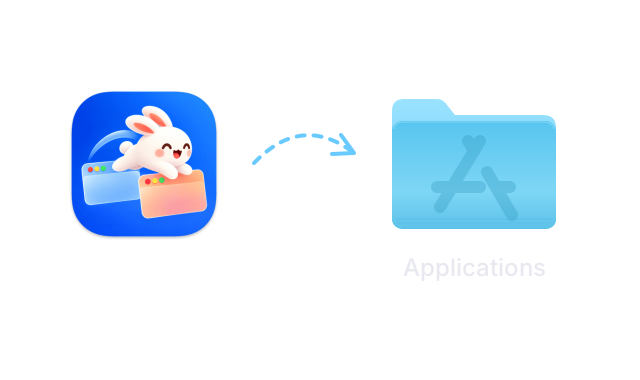 Download AltTab: Download Free for Mac
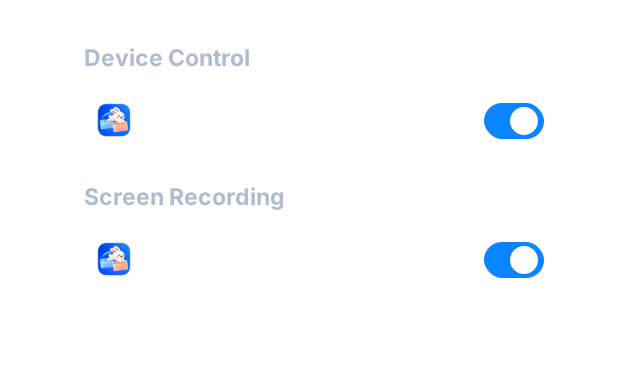 Open AltTab. The first time, macOS asks for Accessibility and Screen Recording permissions in System Settings under Privacy & Security. Accessibility lets AltTab switch windows; Screen Recording lets it show thumbnails. Grant both.
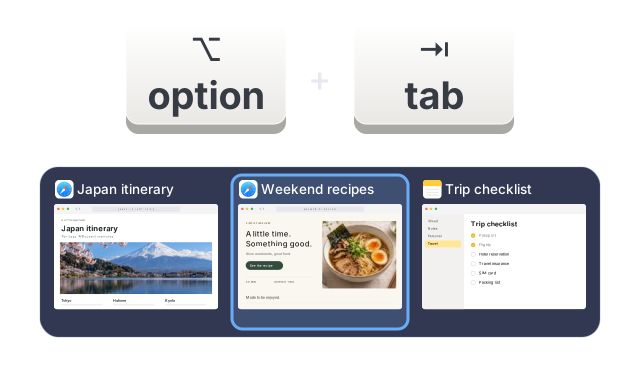 Press Option-Tab, the default shortcut, to bring up the switcher. Hold Option and tap Tab to move through windows, then release to switch. If you want the Windows muscle memory exactly, you can remap the shortcut to Command-Tab in AltTab’s settings.
Not sure yet?
Every Pro feature is free for 14 days after you install. Afterwards, AltTab keeps working for free.