Features
Built for how you actually work
Dark Mode
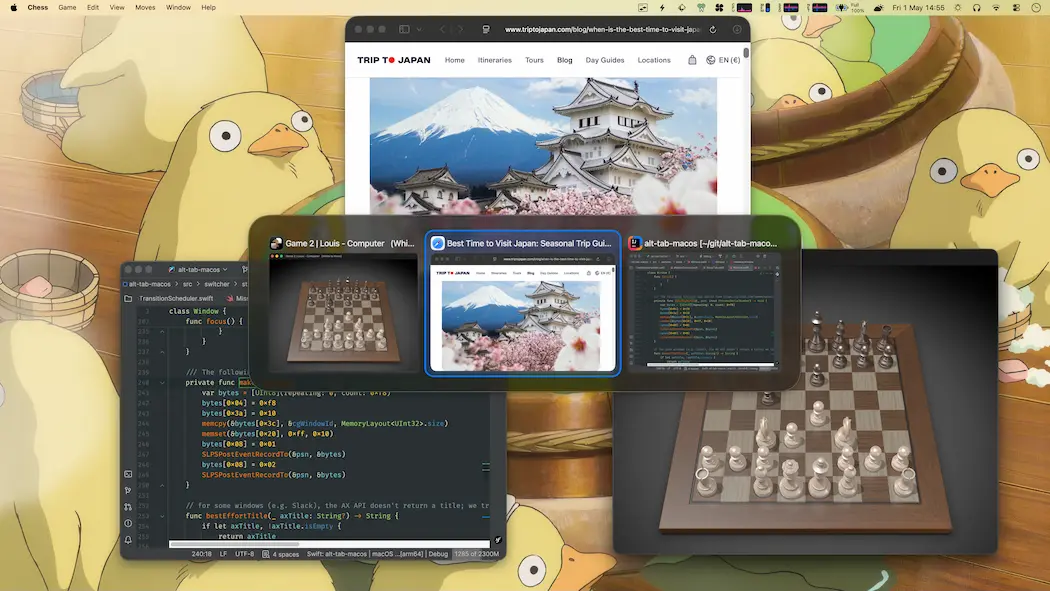
AltTab follows your macOS appearance automatically. Light or dark, the switcher always looks native and polished.
Preview Selected Window on Top
Hover over a thumbnail to see the window at full size above everything else. No guesswork needed.
Instant-release or Keep Open
Choose how AltTab behaves: release the shortcut key to switch instantly, or keep the panel open to browse windows at your own pace. Different shortcuts can have different behaviors.
Status Badges & Traffic Icons
See at a glance which windows are minimized, hidden, or on another Space. Familiar traffic-light icons let you close, minimize, or fullscreen windows directly from the switcher.
Custom Shortcut with Any Key
Configure shortcuts using virtually any key combination — modifier keys, function keys, and more. Each shortcut can filter windows by app, Space, or screen.
With Pro, set up to 9 independent shortcuts, each with its own trigger and filter rules.
Trackpad Gestures
Trigger AltTab with trackpad gestures for a keyboard-free experience. Navigate through windows by swiping, making window switching as fluid as switching between Spaces.
Exceptions to Hide Certain Windows
Running virtual machines, remote desktops, or apps with many sub-windows? Add exceptions to hide specific apps or window types from the switcher. Keep your window list clean and focused on what matters.
Accessibility
AltTab is fully compatible with VoiceOver, sticky keys, and reduced transparency settings. Every element is properly labeled for screen readers, making window switching accessible to everyone.
Compatibility
Whether you’re on a 10-year-old MacBook or the latest Mac, AltTab just works. We support every macOS version from 12 Monterey to the newest release, and run natively on both Intel and Apple Silicon.
Privacy
AltTab respects your privacy. No telemetry, no tracking, no data collection. The app works entirely on your device. Network access is only used for update checks and optional crash reports.
CLI Usage
Control AltTab from the command line. Run commands on the executable inside the .app bundle:
AltTab --list                              # List windows (ID + title) as JSON
AltTab --detailed-list                     # List windows (detailed info) as JSON
AltTab --show=shortcut_index               # Show AltTab UI for a shortcut
AltTab --focus=window_id                   # Focus a specific window by ID
AltTab --focusUsingLastFocusOrder=order    # Focus by last-focus order
AltTab.app must be running to keep track of window state and execute commands.
Localization
AltTab is available in 21 languages:
Bahasa Indonesia, Deutsch, English, Español, Français, Italiano, Nederlands, Polski, Português (Brasil), Svenska, Tiếng Việt, Türkçe, Русский, עִבְרִית, العربية, ภาษาไทย, 日本語, 简体中文, 繁體中文, 繁體中文 (香港), 한국어
